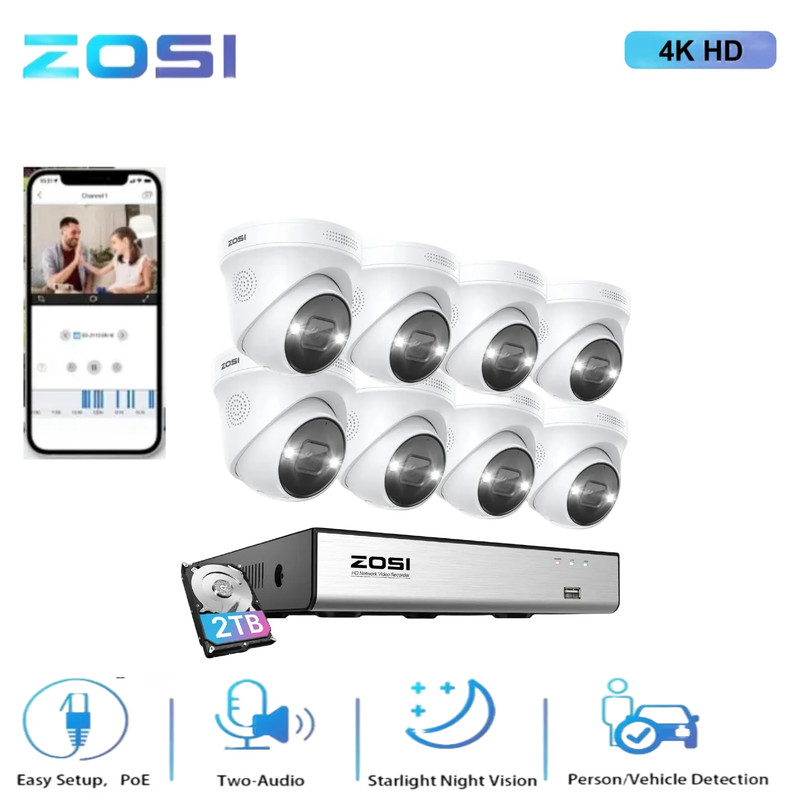


ZOSI 16CH 4K PoE Home Security Camera System AI Audio 4TB HDD Human Detection
Razor Sharp Details in 4K Ultra HD 4K HDR video brings you closer to reality than ever with the finest details captured. Enjoy the best visual experience with 24/7 flawless streaming. Expand to 16-Channel System Expand your camera system to a 16-camera kit by connecting a PoE switch (not included) for improved property coverage. Secure Storage and Management The pre-installed 2TB HDD, expandable up to 8TB, allows for 24/7 simultaneous video and audio recording of all connected cameras. Easy Playback with Filters Easily filter videos by person, vehicle, face, abnormal sound category and quickly find key moments with highlighted lines on the timeline. Save More than 50% Storage Compared with H.264 coding, advanced H.265+ saves about 50% bandwidth and storage for longer recording time and a better viewing experience. Monitor Specified Areas Reduce unnecessary false alarms and focus on what matters by customizing the activity zone. Reliable in All Environments Thanks to its sturdy construction and weather-sealing, this camera is capable of providing reliable surveillance in a variety of environments. Q&A Question 1: Can I add more cameras to this system? Yes. You can add more (only ZOSI) 8MP, 5MP, or 2MP POE Bullet or Dome cameras. But the total number of cameras connected to the NVR should not exceed 8. Noted: This PoE NVR only supports ZOSI WiFi Camera with a particular model (Ethernet Cable Connection), if you want to add a wifi camera to this NVR, please contact customer support first. Question 2: How to get the 4K 8.0MP/5.0MP resolution: (1) Please make sure that your TV monitor is 4K/5MP or better than 4K/5MP resolution, and connect the NVR to your TV monitor. (2) Setup the system, and go to Main Menu- Set up-Basic to change the "Video Output" to "3840 * 2160"(or 2952*1944) manually. Question 3: Why can't I hear audio when watching live on NVR? 1. The NVR can transmit audio only when the monitor/TV is connected via HDMI cable, otherwise the monitor/TV will have no sound output. 2. Click the right mouse button -Go to Main Menu- Set up - Click the audio, you can adjust the volume and select the channel to play the audio. Noted: The quality of the image is related to where you install this camera. 1. Better to install cameras in a position with a wide field of vision, and the best outdoor installation height is 4-8 meters. 2. The direction of the lens should avoid the angle facing the light source as much as possible. 3. The installation environment should avoid a high dust environment as much as possible. On Sep 20, 2023 at 21:07:24 PDT, seller added the following information:
Specifications
| Return Shipping Will Be Paid By | Seller |
| All Returns Accepted | Returns Accepted |
| Item Must Be Returned Within | 30 Days |
| Refund Will Be Given As | Money Back |
| Brand | ZOSI |
| Model | SmartCam |
| Power Source | Hardwired, poe |
| Items Included | Camera |
| Storage Capacity | 2TB |
| Surveillance Technology | CCTV |
| Manufacturer Warranty | 1 Year |
| Color | White |
| Type | Multiple Room System |
| Camera Type | Dome |
| Maximum Resolution | 3840*2160 |
| Connectivity | Ethernet Cable |
| Application | Indoor/Outdoor |
| Operating Sound Rating | 60 dB |
| Smart Home Protocol | Infrared |
| Location | Outdoor & Indoor |
| Power | 24 W |
| Camera Connectivity | IP/Network - Wired |
| Waterproof Level | IP66 |
| Voltage | 48V |
| Smart Home Compatibility | ZOSI Smart |
| MPN | Does not apply |
| Country/Region Of Manufacture | China |
| Features | Add-On Camera |
Razor Sharp Details in 4K Ultra HD 4K HDR video brings you closer to reality than ever with the finest details captured. Enjoy the best visual experience with 24/7 flawless streaming. Expand to 16-Channel System Expand your camera system to a 16-camera kit by connecting a PoE switch (not included) for improved property coverage. Secure Storage and Management The pre-installed 2TB HDD, expandable up to 8TB, allows for 24/7 simultaneous video and audio recording of all connected cameras. Easy Playback with Filters Easily filter videos by person, vehicle, face, abnormal sound category and quickly find key moments with highlighted lines on the timeline. Save More than 50% Storage Compared with H.264 coding, advanced H.265+ saves about 50% bandwidth and storage for longer recording time and a better viewing experience. Monitor Specified Areas Reduce unnecessary false alarms and focus on what matters by customizing the activity zone. Reliable in All Environments Thanks to its sturdy construction and weather-sealing, this camera is capable of providing reliable surveillance in a variety of environments. Q&A Question 1: Can I add more cameras to this system? Yes. You can add more (only ZOSI) 8MP, 5MP, or 2MP POE Bullet or Dome cameras. But the total number of cameras connected to the NVR should not exceed 8. Noted: This PoE NVR only supports ZOSI WiFi Camera with a particular model (Ethernet Cable Connection), if you want to add a wifi camera to this NVR, please contact customer support first. Question 2: How to get the 4K 8.0MP/5.0MP resolution: (1) Please make sure that your TV monitor is 4K/5MP or better than 4K/5MP resolution, and connect the NVR to your TV monitor. (2) Setup the system, and go to Main Menu- Set up-Basic to change the “Video Output” to “3840 * 2160″(or 2952*1944) manually. Question 3: Why can’t I hear audio when watching live on NVR? 1. The NVR can transmit audio only when the monitor/TV is connected via HDMI cable, otherwise the monitor/TV will have no sound output. 2. Click the right mouse button -Go to Main Menu- Set up – Click the audio, you can adjust the volume and select the channel to play the audio. Noted: The quality of the image is related to where you install this camera. 1. Better to install cameras in a position with a wide field of vision, and the best outdoor installation height is 4-8 meters. 2. The direction of the lens should avoid the angle facing the light source as much as possible. 3. The installation environment should avoid a high dust environment as much as possible. On Sep 20, 2023 at 21:07:24 PDT, seller added the following information:


