Tiger 911 Auto Telephone Dialer Calling Transfer Tool Fixed Terminal For Alarm
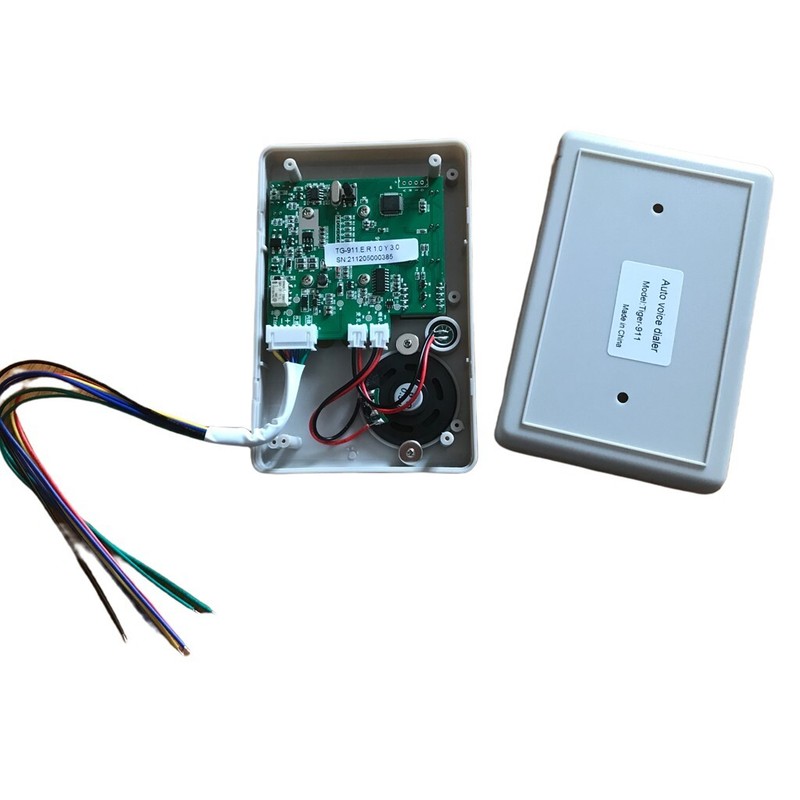
Tiger 911 Auto telephone Dialer Alarm system accessories Calling Transfer Tool Fixed Terminal put in NC NO or voltageNote:This Dilaer just suitable for PSTN/Program-controlled telephone network cable/DTMF dialing.Not Compatible to the Fibel Optical Telephone wireFeatures:Working voltage: DC11V TO 15 vStatic electricity: 20 ma (at DC12V)Dialing method: PSTN DTMF dialingAlarm: N.C., N.O. and voltage signalThe recording time: 0 seconds, after power off the phone number, voice is not lostPhone store telephone number: 4 group, each group may be deposited in the longest 16 digitsSecondary private password: 0-6 private password, remove top three available alarm, as a whole (6) code is used to change the SettingsThe factory password: 911 Or 0911 (1) the speaker(2) the microphone(3) 7 segment display: to store the number of input, will show the number at the same time(4) the E4 light: set the E4 number, this goes on(5) E1 indicator light: setting E1 telephone or mobile phone number, this goes on( 6) E2 status of E2 telephone or mobile phone number, lamp goes on(7) E3 indicator light: setting E3 telephone or mobile phone number, this goes on(13) P button can be for the following purposes:Can store 6 digit number as a passwordWiring:Green ---- telephone Line output, connected to telephone, regardless of positive and negative port.Blue --- telephone line input, regardless of positive and negative portRed --- 12V power supplyBlack ---- Negative pole of power supplyBlack and yellow are signal trigger output.Signal trigger wire, When connected to the N.C. or N.O., the polarity ofelectrodes can be neglected. But when dealing with the DC12V, the yellowwire is for the positive pole. Microcomputer automatic machine for help AUTO - DIALER operatingAfter startup self-check first:After self-testing enter the working state, seven segment display of the lower right corner point, if has the information, received the alarm signal the Dialer will alarm, if you want setting or edit setting, do like these stepsTo set .view phone number.password and record1. Start to programmingFirst press P then enter personal password (0 to 6) then press EnterNote: the factory out code is 0911For example: the new machine does not change the password when the state of programming operation is as follows:P 0 9 1 1 EnterIf password input the correct display S and then into programming, S means Sequence.If password input error display E, then back to work status, need login a corrected password2. setting the first number:At the state of programming,(display S),for example, the number is 9353399, so like thisE1 9 3 5 3 3 9 9 ENTERType in the ENTER of time store number, if it display 0, It mean number have been storageAnd then returns to S state, if it is display E, said failed to correct,Machine will return S state, the user can operate again, if you want to remove the first number, When display S you press E1,and then press ENTERIf the dialer will first call telephone switchboard, Do not need switchboard operator,and then auto call extension telephone, such as the extension number is 12,do as below:E1 9 3 5 3 3 3 9 9 P 1 2 ENTEREach time you press the P, meaning pause 2 seconds, if twice, meaning pause 4 seconds(Store 2, 3, 4,number is the same way like number 1)3.View the number what you have been setted:In the condition of programming, which showed S state, press 3, displayed C, mean CHECK, then you wantQuery of E1, E2, E3, E4 or PAUSE, began to display number, its operating procedures are as follows:3 E1 or E2 or E3 or E4 or P display shows the number or password, when finish shows ,buzzer will”du” rang
Specifications
| Return Shipping Will Be Paid By | Buyer |
| All Returns Accepted | Returns Accepted |
| Item Must Be Returned Within | 30 Days |
| Brand | Unbranded |
| Type | Multiple Room System |
| Items Included | Alarm |
| Model | Tiger 911 |
| Features | Auto Dialer |
| Location | Indoor Only |
Tiger 911 Auto telephone Dialer Alarm system accessories Calling Transfer Tool Fixed Terminal put in NC NO or voltageNote:This Dilaer just suitable for PSTN/Program-controlled telephone network cable/DTMF dialing.Not Compatible to the Fibel Optical Telephone wireFeatures:Working voltage: DC11V TO 15 vStatic electricity: 20 ma (at DC12V)Dialing method: PSTN DTMF dialingAlarm: N.C., N.O. and voltage signalThe recording time: 0 seconds, after power off the phone number, voice is not lostPhone store telephone number: 4 group, each group may be deposited in the longest 16 digitsSecondary private password: 0-6 private password, remove top three available alarm, as a whole (6) code is used to change the SettingsThe factory password: 911 Or 0911 (1) the speaker(2) the microphone(3) 7 segment display: to store the number of input, will show the number at the same time(4) the E4 light: set the E4 number, this goes on(5) E1 indicator light: setting E1 telephone or mobile phone number, this goes on( 6) E2 status of E2 telephone or mobile phone number, lamp goes on(7) E3 indicator light: setting E3 telephone or mobile phone number, this goes on(13) P button can be for the following purposes:Can store 6 digit number as a passwordWiring:Green —- telephone Line output, connected to telephone, regardless of positive and negative port.Blue — telephone line input, regardless of positive and negative portRed — 12V power supplyBlack —- Negative pole of power supplyBlack and yellow are signal trigger output.Signal trigger wire, When connected to the N.C. or N.O., the polarity ofelectrodes can be neglected. But when dealing with the DC12V, the yellowwire is for the positive pole. Microcomputer automatic machine for help AUTO – DIALER operatingAfter startup self-check first:After self-testing enter the working state, seven segment display of the lower right corner point, if has the information, received the alarm signal the Dialer will alarm, if you want setting or edit setting, do like these stepsTo set .view phone number.password and record1. Start to programmingFirst press P then enter personal password (0 to 6) then press EnterNote: the factory out code is 0911For example: the new machine does not change the password when the state of programming operation is as follows:P 0 9 1 1 EnterIf password input the correct display S and then into programming, S means Sequence.If password input error display E, then back to work status, need login a corrected password2. setting the first number:At the state of programming,(display S),for example, the number is 9353399, so like thisE1 9 3 5 3 3 9 9 ENTERType in the ENTER of time store number, if it display 0, It mean number have been storageAnd then returns to S state, if it is display E, said failed to correct,Machine will return S state, the user can operate again, if you want to remove the first number, When display S you press E1,and then press ENTERIf the dialer will first call telephone switchboard, Do not need switchboard operator,and then auto call extension telephone, such as the extension number is 12,do as below:E1 9 3 5 3 3 3 9 9 P 1 2 ENTEREach time you press the P, meaning pause 2 seconds, if twice, meaning pause 4 seconds(Store 2, 3, 4,number is the same way like number 1)3.View the number what you have been setted:In the condition of programming, which showed S state, press 3, displayed C, mean CHECK, then you wantQuery of E1, E2, E3, E4 or PAUSE, began to display number, its operating procedures are as follows:3 E1 or E2 or E3 or E4 or P display shows the number or password, when finish shows ,buzzer will”du” rang